
Templates / Finance
Vestry finance report
You will have: a two-page report your vestry can read in five minutes, with the same questions answered the same way every month.
- 6 steps
- About 2 hours the first month, under an hour after that
- Free
- Checked
You will need: your treasurer, a login to your accounting system that can download reports, and Claude or ChatGPT. In Claude, turn on file creation (Settings, then Capabilities) so it can read spreadsheets and hand back a Word file.
Every template comes with the steps to finish it with your AI.
Step 1 of 6: Set up the report once, with your treasurer
Your part
Sit with your treasurer. Download two reports: Profit and Loss for the last twelve months, and the Balance Sheet for last month. Give them to Claude with the settings file and answer its questions. Save the file Claude gives you, report-settings.md, where you keep your vestry papers. You will attach it every month.
Claude’s part
Reads the two reports and drafts every setting from them: which accounts are everyday cash, plain names for at most five groups of money in and five of money out, and what is set aside. Then it asks you one question at a time to confirm.
Instructions for Claude
I am attaching three files: our church’s Profit and Loss for the last twelve months, our Balance Sheet at the end of last month, and a file called report-settings.md. Help me fill in report-settings.md for a monthly finance report to our [vestry]. Draft every answer you can from the two reports first: which bank accounts pay our everyday bills, which accounts hold money set aside (an endowment, a memorial fund, money still on its way from online giving), and plain names a vestry member would use for at most five groups of money in and five of money out, each with the account numbers in it. Show me your draft and say why you chose each one. Then ask me one question at a time about whatever the reports cannot tell you: our plan for the year, what the vestry is watching, our obligations and who approves the report. Do not guess. Hand back the finished report-settings.md as a file.
Faster with Church Labs: tell Claude “Set up the finance report”.
Get started to download: Report settings to fill inYou sign in with a link by email. No password.You are done when
A settings file with no [brackets] left, which your treasurer has read. It names your everyday bank accounts, the money set aside, your groups, your plan for the year, what the vestry is watching and who approves the report.
How St. Clement’s did it
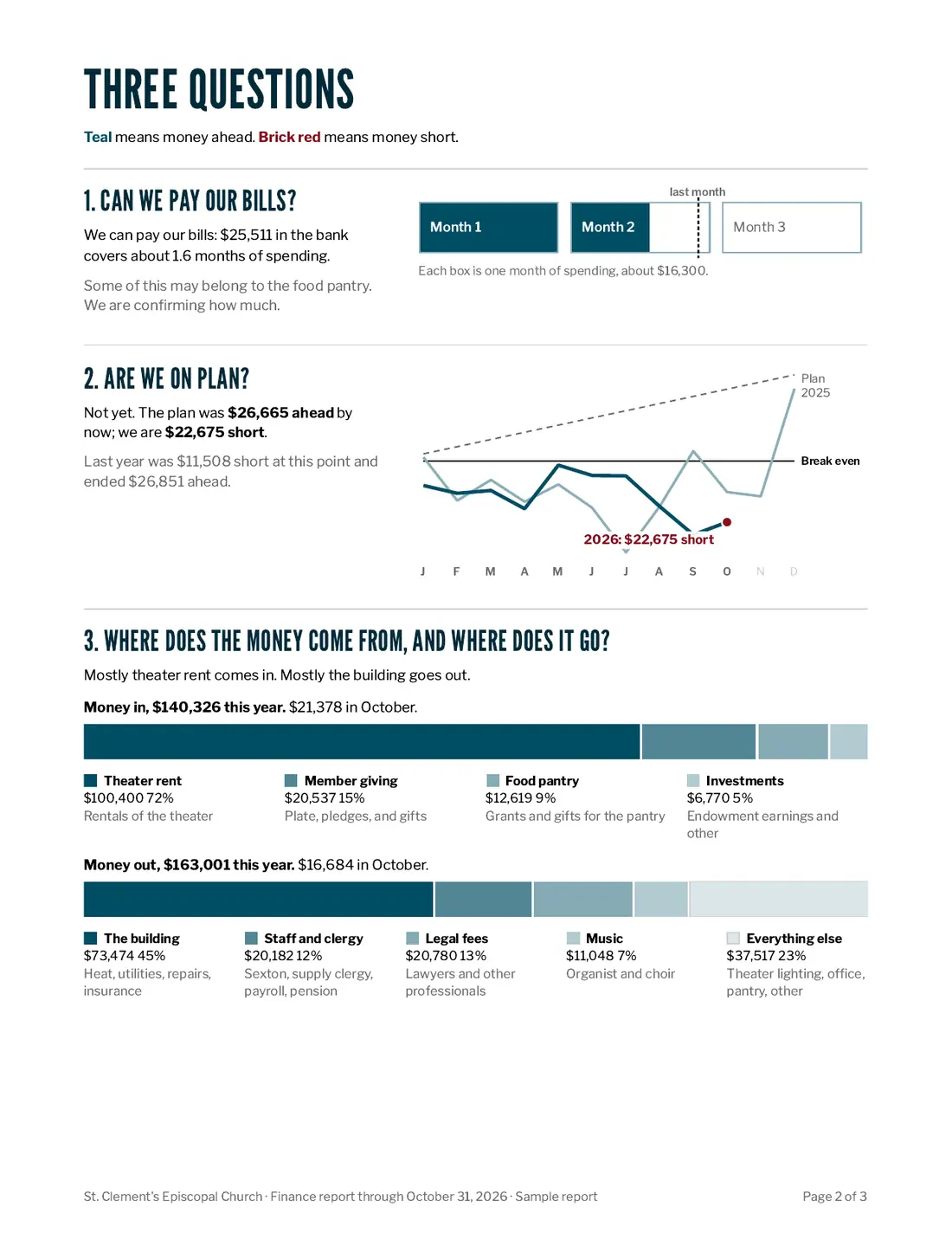
Most of St. Clement’s money comes from renting its theater, so in the sample Theater rent leads money in and The building leads money out. Legal fees have a line of their own, and the pressure question is “Does theater rent cover the building?”
Step 2 of 6: Download this month’s reports
Your part
Make a folder for the month, named for the month the books run through, such as 2026-10. Download the four reports into it as Excel files. Wait until your bookkeeper has entered the month; a month with no income in it is not finished yet.
Claude’s part
Gives you the clicks for your accounting system, one report at a time, and the dates to put in.
Instructions for Claude
Our church keeps its books in [QuickBooks Online, or another system]. I need to download four reports as Excel files for our finance report through [the last day of last month]: 1. The Balance Sheet, with a column for each month, for the last thirteen months. 2. Profit and Loss with a column for each month, from the first day of our church’s year through that date. 3. The same Profit and Loss for last year, for the whole year. 4. Budget vs. Actuals for this year so far, with a column for each month, if we have a budget. Give me the exact clicks and the dates to type for each one, one numbered step at a time. Tell me how to check that each report covers the right dates. Do not ask me for any password.
You are done when
This month’s folder holds four reports: the Balance Sheet by month for the last thirteen months, Profit and Loss by month for this year so far, the same for last year, and Budget vs. Actuals if you have a budget.
How St. Clement’s did it
St. Clement’s keeps its books in QuickBooks Online. Its September report was built two days after the month ended.
Step 3 of 6: Work out the numbers
Your part
Give Claude the four reports and your settings file. Read its numbers sheet, and check two figures yourself against the reports: the bank total and the year so far.
Claude’s part
Works out every figure the report needs, says which report and line each one came from, and checks that the totals agree. Where something does not add up, it stops and tells you instead of filling the gap.
Instructions for Claude
I am attaching our finance report settings (report-settings.md) and this month’s reports from our accounting system: the Balance Sheet by month, Profit and Loss by month for this year and for last year, and Budget vs. Actuals. Work out the numbers for our finance report through [the last day of last month]. Use only these files, and our settings for which accounts count as everyday cash and how accounts are grouped. Give me: 1. In the bank at month end, the same a month earlier, and the change. 2. Money in and money out this month. 3. The year so far, ahead or short, at the end of each month this year and each month last year, and how last year ended. 4. The plan to date, at the end of each month if the budget shows it. 5. Average monthly spending over the last twelve months, and how many months of it the bank covers now and covered a month earlier. 6. Money in and out by our groups, this year and this month, with each group’s share. 7. Month-end bank cash for every month in the Balance Sheet. 8. Each set-aside account at month end, listed apart. For every figure, name the report and line it came from. Then check that your groups add up to the reports’ totals, and that the Balance Sheet and Profit and Loss agree. If a month has no income at all, say it is not recorded yet; do not call it a bad month. If anything does not agree, stop and tell me; do not change a figure to make it fit. Round to whole dollars. Hand it back as a file called numbers.md.
Faster with Church Labs: tell Claude “Build the finance report”.
You are done when
A numbers sheet, numbers.md, in this month’s folder. Every figure names its source, every check passes, and anything the books cannot show yet is listed.
How St. Clement’s did it
When St. Clement’s built its September report, September had no income recorded yet. Claude caught it, set aside the draft’s “a light month”, and read the year through August instead.
Step 4 of 6: Update what the vestry is watching
Your part
Answer Claude’s questions, one item at a time. Say what changed and whether it is settled. Add anything new the vestry should follow, and say if there is a vote this month.
Claude’s part
Goes through last month’s watch list with you, item by item, and fills in the figure for anything the numbers sheet can measure.
Instructions for Claude
I am attaching our finance report settings, this month’s numbers sheet (numbers.md) and last month’s watch list if we have one. Go through each item the vestry is watching with me, one at a time. For each, tell me what the numbers show if they measure it, then ask me what changed and what happens next. Keep each item’s latest fact to one or two sentences. Give each item a status: New, Better, Worse, No change or Resolved. Ask me whether there is anything new to add, whether the vestry is asked to decide anything this month, and whether each obligation in the settings is current. Anything that could alarm the vestry, such as money given for one purpose possibly spent on another, or a late filing, goes to me and the treasurer first, not into the report. Hand back watch-list.md as a file.
You are done when
A watch list, watch-list.md, in this month’s folder. Each item has its status, the latest fact and the next step with a name on it. The obligations are marked confirmed or to confirm.
How St. Clement’s did it
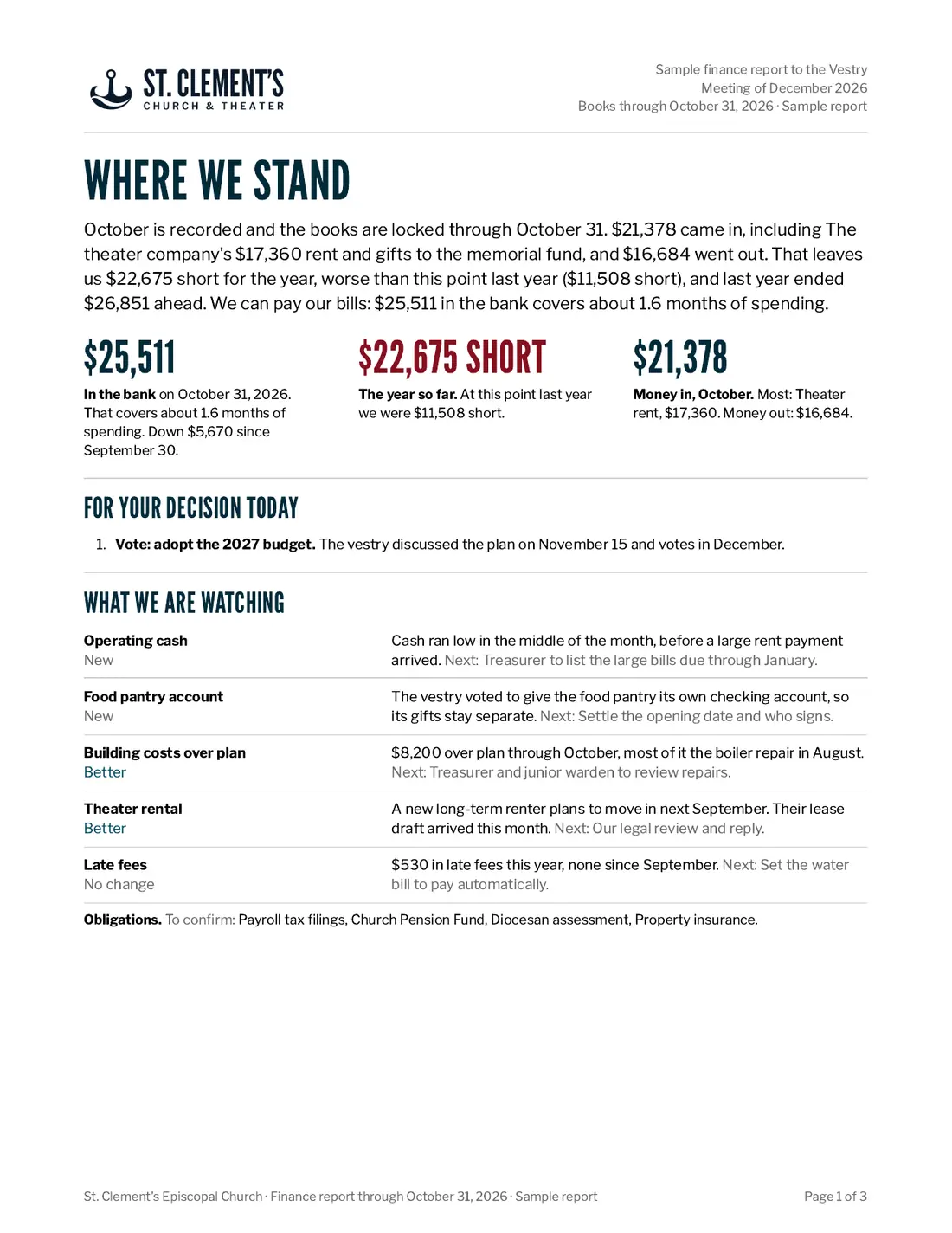
St. Clement’s sample watches five items: operating cash, a new food pantry account, building costs over plan, theater rental and late fees. Each line ends with the next step and who takes it.
Step 5 of 6: Fill in the report
Your part
Give Claude the Word template, the numbers sheet and the watch list. Read the short answer at the top aloud. Ask for changes until it says what you would say.
Claude’s part
Writes the short answer, fills every part of the template from the numbers sheet, draws the pictures and hands back a Word file you can change.
Instructions for Claude
I am attaching four files: our finance report template (vestry-finance-report-template.docx), this month’s numbers sheet (numbers.md), our watch list (watch-list.md) and our report settings. Fill in the template for the report through [the last day of last month], to the [vestry] meeting of [month and year]. Take every figure from the numbers sheet and every watch item from the watch list; do not work out new figures. Write the short answer at the top in two or three sentences, 70 words at most: first what the month recorded, then the year so far against the same point last year, then whether we can pay our bills. Name a cause only if the numbers show it. Use plain words, no accounting terms. Wherever the template asks for a picture, draw the chart it describes, simply, in two colors: teal for money ahead and brick red for money short. Draw the money in and money out bars in shades of teal, since neither is ahead or short. Leave out page 3 unless I ask for it. Mark it Draft for review. Keep it to two pages: before you hand it back, check the page count, and if it runs over, shorten the watch list wording first, then make the charts smaller. Hand back the finished report as a Word file.
Once a year, add the longer view
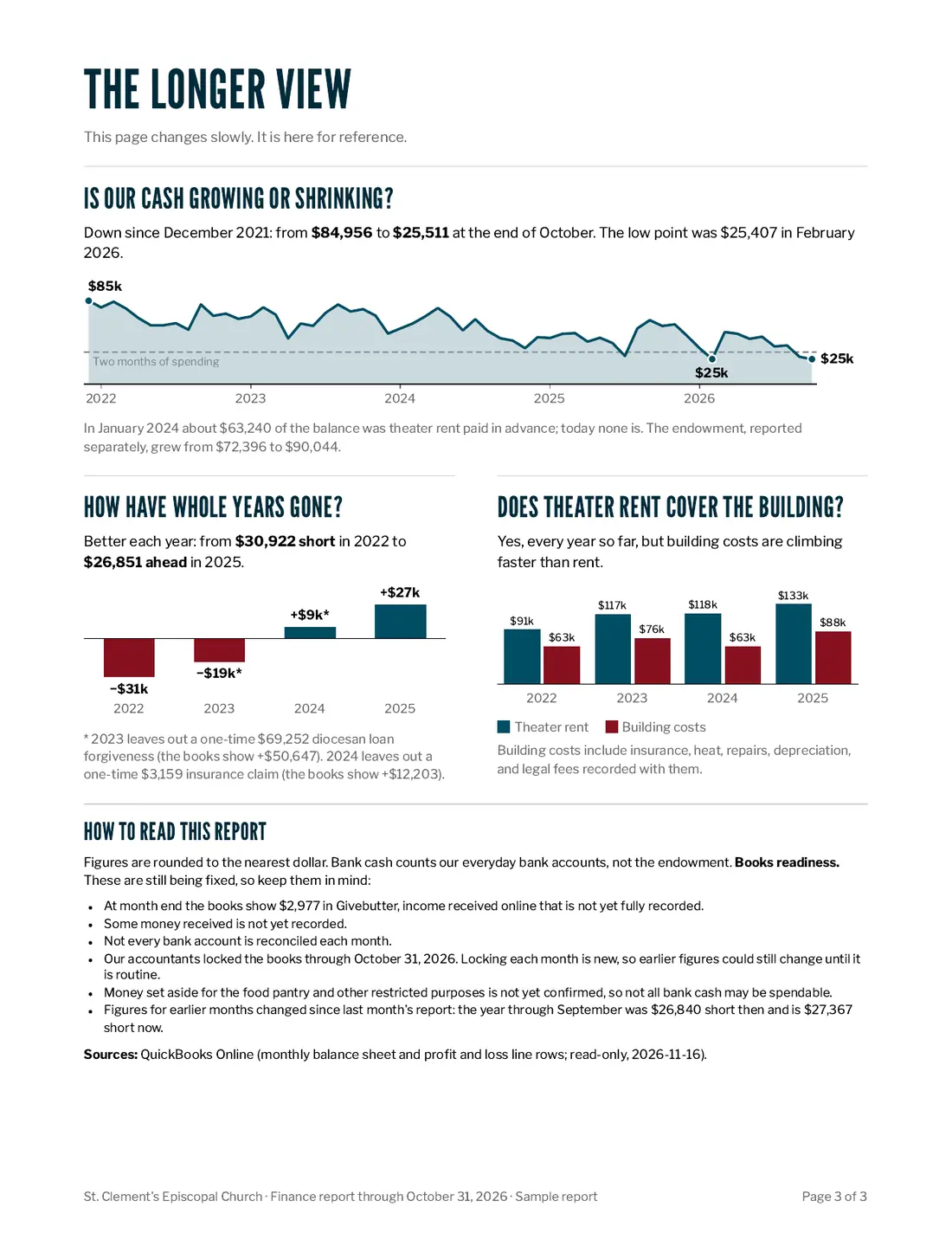
Also fill in page 3, The longer view, from the numbers sheet and our settings: month-end bank cash since our history starts, each whole year’s result with any one-time item left out and marked with a star, and our pressure question with a pair of bars for each year.
Faster with Church Labs: tell Claude “Build the finance report”.
Get started to download: The report templateYou sign in with a link by email. No password.You are done when
A Word file, report-draft.docx, of two pages, with a third once a year for the longer view. The short answer is 70 words or fewer. Every figure matches the numbers sheet, and no [brackets] are left.
How St. Clement’s did it
The sample is in St. Clement’s design, with sample figures. The Church Labs skill draws it as a PDF in the church’s own colors and type; the Word template here gives the same pages in any church’s look.
Step 6 of 6: Have the treasurer approve it, then send it
Your part
Send the draft to your treasurer with the checklist. When they approve it, change Draft for review to Final, save it as a PDF and send it with the vestry packet.
Claude’s part
Writes the note to your treasurer and the checklist they work through, and makes the final changes they ask for.
Instructions for Claude
I am attaching this month’s draft finance report and its numbers sheet. Write a short note from me to our treasurer, [name], asking them to approve it before the [vestry] meeting on [date]. Include a checklist of what to confirm: the bank total and the year so far against our accounting reports; the short answer, word by word; each obligation is current; and anything listed as not yet recorded. Keep it under 150 words, in plain words.
After the treasurer replies
Our treasurer replied: [paste their reply]. Make only the changes they asked for, change Draft for review to Final, and hand back the report as a Word file and as a PDF.
You are done when
Your treasurer has approved the short answer and confirmed each obligation. report-final.pdf is in this month’s folder and has gone to the vestry. The numbers sheet and the draft stay beside it.
How St. Clement’s did it
Built with the Church Labs skill, St. Clement’s September report took 22 minutes and five questions. The skill will not mark a report Final until the treasurer has approved the short answer.
When you finish
Next in Finance: Accounting manual. Bring what you made to the open house and show it.
The weekly open house
Free and live. Next: Monday, November 30 at noon Eastern, on building great vestry reports with Claude. Bring what you are working on.